rotate
unreviewed draftTurns the image around the center of the screen, by a fixed angle and/or continuously over time.
.rotate( angle = 10, speed = 0 )geometry (coordinate transform)
What it does
Section titled “What it does”rotate is a geometry function. It does not move pixels; it changes which coordinate the
earlier part of the chain is asked to draw at each pixel (see Coordinate space).
For screen coordinate it hands the source
Sampling through makes the image appear turned by . Hydra’s axis points down the screen, so positive angles look clockwise.
Rotation happens in normalized coordinates where the canvas is a 1 × 1 square, whatever its real shape. On a wide canvas that means the image is squashed and stretched as it turns (see the quirk below).
Pixels that land outside the source’s area show whatever that source does there: src() repeats
(tiles) the texture, osc and noise simply continue, and shape is black.
rotate source in glsl-functions.js (hydra-synth 1.4.0) ↗
Examples
Section titled “Examples”osc(40, 0.05, 1.2).rotate(0, 0.2).out()shape(4, 0.3, 0.01).rotate(() => Math.sin(time) * 0.5).out()shape(4, 0.3, 0.01).scale(1, width / height, 1).rotate(0, 0.3).scale(1, height / width, 1).out()The last example converts to square units before rotating and back afterwards. Geometry functions apply to
coordinates in reverse chain order: the final .scale(1, height / width, 1) runs first.
The math runs in 0–1 coordinates on both axes, so on a 16 : 9 canvas shapes shear partway through a
turn. Look at the 45° tile (0.7854) in the angle strip: the card’s circle, which is round in pixels,
becomes a tilted ellipse, and the “F“‘s right angles close up. The third example above shows the fix.
Rotates the coordinates fed to everything earlier in the chain, about the screen center .
| Parameter | Default | Useful range | Units | No-op at |
|---|---|---|---|---|
angle | 10 | -6.2832 … 6.2832 | radians ( = one full turn) | 0 (or any multiple of ), with speed = 0 |
speed | 0 | -2 … 2 | radians / second (one turn every s) | 0 |
angle= 10
Fixed rotation, in radians. Positive turns the image clockwise on screen.
- Useful range
- -6.2832 … 6.2832
- Units
- radians ( = one full turn)
- No-op at
0(or any multiple of ), withspeed= 0- Negative values
- counter-clockwise
- Periodic
- every (6.283…);
10looks the same as - Accepts
- number · array · function
The default 10 is not a "small" rotation: 10 rad ≈ 573°, which is 213° after removing one full turn.
So .rotate() with no arguments turns the image a bit more than half way around.
Degrees → radians: multiply by Math.PI / 180.
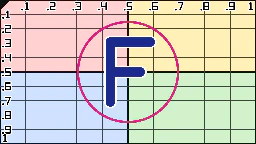 0
0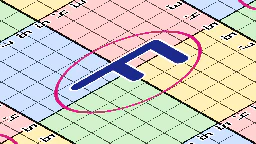 0.7854
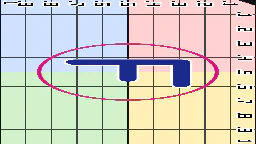 1.5708
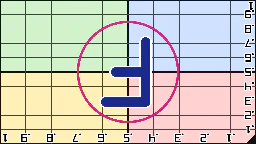 3.1416
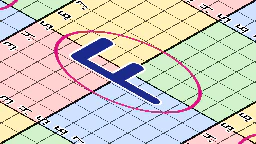 -0.7854
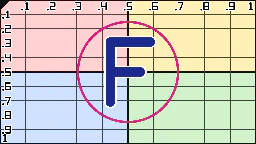 6.2832
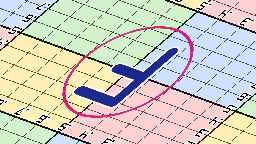 10
10angle (still at time = 0): s0.initImage("https://hydra-ref.audiodude.xyz/cards/uv-grid.png")
src(s0).rotate({angle}, 0).out()
· outlined tile = defaultspeed= 0
Continuous rotation added on top of angle, in radians per second of hydra time.
- Useful range
- -2 … 2
- Units
- radians / second (one turn every s)
- No-op at
0- Negative values
- spins counter-clockwise
- Accepts
- number · array · function
The total angle is , where time is hydra's clock
(seconds since start, multiplied by the global speed). Because it's added to an ever-growing time,
changing speed while running makes the image jump to a new angle rather than smoothly change pace.
speed (3s loops): s0.initImage("https://hydra-ref.audiodude.xyz/cards/uv-grid.png")
src(s0).rotate(0, {speed}).out()
· outlined tile = defaultGotchas
Section titled “Gotchas”- The pivot is always the screen center. To rotate around another point,
scrollso that point sits at the center, rotate, thenscrollback. speedmultiplies an ever-growingtime, so changing it live makes the image jump. For smooth changes of pace, pass a function toanglethat accumulates its own angle instead.
Related
Section titled “Related”- scroll: move the image; combine with
rotateto move the pivot. - Coordinate space: why geometry runs “backwards” through the chain.
- Arguments & time: arrays and functions as
angle/speed.
Documents hydra-synth 1.4.0 (AGPL-3.0; this site runs it unmodified). Annotations drafted by Claude (Anthropic) from the hydra-synth source and checked against rendered output — see about. Site code AGPL-3.0, prose CC BY 4.0,source.