scroll
unreviewed draftSlides the image sideways and/or up and down, wrapping it around the edges, by a fixed amount or continuously over time.
.scroll( scrollX = 0.5, scrollY = 0.5, speedX = 0, speedY = 0 )geometry (coordinate transform).scrollX( scrollX = 0.5, speed = 0 )geometry (coordinate transform).scrollY( scrollY = 0.5, speed = 0 )geometry (coordinate transform)
What it does
Section titled “What it does”scroll, scrollX and scrollY are geometry functions: they change which coordinate the earlier
part of the chain is asked to draw at each pixel (see Coordinate space). For screen
coordinate , scroll hands the source
where is hydra’s time in seconds. Two things follow:
- Direction. The pixel at shows what used to be at , i.e. the content that was a quarter screen to its right. So a positive shift moves the image left, and (because points down the screen) a positive vertical shift moves it up.
- Wrapping.
fractthrows away the whole-number part, so coordinates always land back in : what scrolls off one edge comes back on the opposite one, and a shift of1is the same as0.
Units are fractions of the screen: 0.25 is a quarter of the width (for ) or height (for ),
whatever the canvas size, and speeds are screens per second.
scrollX(scrollX, speed) and scrollY(scrollY, speed) are the same thing on one axis, with the speed
parameter renamed to plain speed.
scroll source in glsl-functions.js (hydra-synth 1.4.0) ↗
scrollX source in glsl-functions.js (hydra-synth 1.4.0) ↗
scrollY source in glsl-functions.js (hydra-synth 1.4.0) ↗
Examples
Section titled “Examples”s0.initImage("https://hydra-ref.audiodude.xyz/cards/uv-grid.png")src(s0).scroll(0, 0, 0.1, 0).out()shape(3, 0.3, 0.01).scrollX(() => Math.sin(time) * 0.25, 0).out()s0.initImage("https://hydra-ref.audiodude.xyz/cards/uv-grid.png")src(s0).scroll(-0.25, -0.25).rotate(0, 0.5).scroll(0.25, 0.25).out()shape(4, 0.3, 0.01).scroll(0, 0, 0.05, 0.05).scale(0.5).out()The third example reads left to right as image operations: move the point to the center
(a negative scroll moves the image right and down), spin around the center, move it back. The pivot stays
fixed: probing it with gradient() and a 90° rotate returns the same color at before and
after. The last example relies on the wrap described below.
Parameters
Section titled “Parameters”scroll
Section titled “scroll”Shifts the coordinates fed to everything earlier in the chain by a fixed and/or time-growing amount, then wraps them into 0–1.
| Parameter | Default | Useful range | Units | No-op at |
|---|---|---|---|---|
scrollX | 0.5 | -1 … 1 | screen widths (fraction of the canvas width) | 0 (or any whole number), with speedX = 0; the wrap still applies, see Gotchas |
scrollY | 0.5 | -1 … 1 | screen heights (fraction of the canvas height) | 0 (or any whole number), with speedY = 0; the wrap still applies, see Gotchas |
speedX | 0 | -1 … 1 | screen widths / second (one full lap every s) | 0 |
speedY | 0 | -1 … 1 | screen heights / second (one full lap every s) | 0 |
scrollX= 0.5
Fixed horizontal shift, in screen widths. Positive moves the image left.
- Useful range
- -1 … 1
- Units
- screen widths (fraction of the canvas width)
- No-op at
0(or any whole number), withspeedX= 0; the wrap still applies, see Gotchas- Negative values
- moves the image right
- Periodic
- every
1;1.25looks the same as0.25 - Accepts
- number · array · function
The default is 0.5, not 0: .scroll() with no arguments moves the image half a screen left
and half a screen up, so whatever was in the center ends up split across the four corners.
The image wraps around: what leaves on the left comes back on the right.
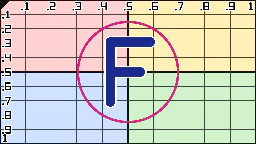 0
0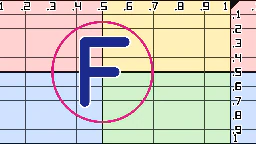 0.1
0.1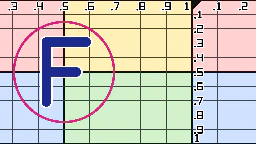 0.25
0.25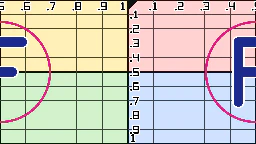 0.5
0.5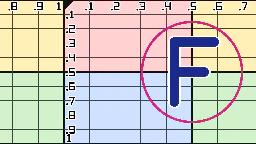 -0.25
-0.25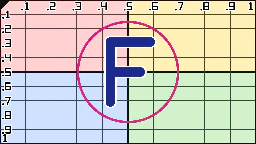 1
1scrollX (still at time = 0): s0.initImage("https://hydra-ref.audiodude.xyz/cards/uv-grid.png")
src(s0).scroll({scrollX}, 0, 0, 0).out()
· outlined tile = defaultscrollY= 0.5
Fixed vertical shift, in screen heights. Positive moves the image up.
- Useful range
- -1 … 1
- Units
- screen heights (fraction of the canvas height)
- No-op at
0(or any whole number), withspeedY= 0; the wrap still applies, see Gotchas- Negative values
- moves the image down
- Periodic
- every
1 - Accepts
- number · array · function
Hydra's axis points down the screen, and scroll adds to the coordinate, so positive values pull
content from below: the image moves up.
0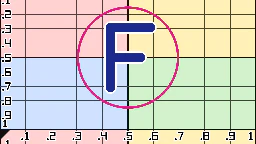 0.1
0.1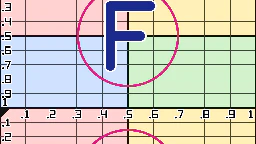 0.25
0.25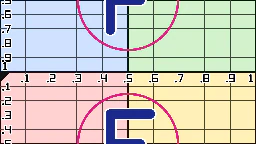 0.5
0.5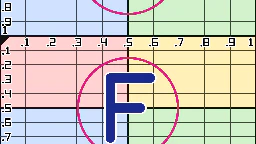 -0.25
-0.25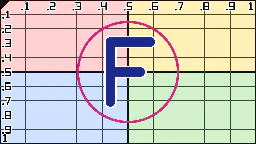 1
1scrollY (still at time = 0): s0.initImage("https://hydra-ref.audiodude.xyz/cards/uv-grid.png")
src(s0).scroll(0, {scrollY}, 0, 0).out()
· outlined tile = defaultspeedX= 0
Continuous horizontal scrolling, in screen widths per second. Positive moves the image left.
- Useful range
- -1 … 1
- Units
- screen widths / second (one full lap every s)
- No-op at
0- Negative values
- scrolls right
- Accepts
- number · array · function
The total shift is , where is hydra's time in seconds.
speedX multiplies an ever-growing time, so changing it while running makes the image jump to a new
position rather than smoothly change pace.
The strip clips are 3 s long, so 0.3333 makes exactly one lap per loop.
speedX (3s loops): s0.initImage("https://hydra-ref.audiodude.xyz/cards/uv-grid.png")
src(s0).scroll(0, 0, {speedX}, 0).out()
· outlined tile = defaultspeedY= 0
Continuous vertical scrolling, in screen heights per second. Positive moves the image up.
- Useful range
- -1 … 1
- Units
- screen heights / second (one full lap every s)
- No-op at
0- Negative values
- scrolls down
- Accepts
- number · array · function
The total shift is . Same jump-on-change caveat as speedX.
speedY (3s loops): s0.initImage("https://hydra-ref.audiodude.xyz/cards/uv-grid.png")
src(s0).scroll(0, 0, 0, {speedY}).out()
· outlined tile = defaultscrollX
Section titled “scrollX”Horizontal-only scroll. Still wraps both axes into 0–1.
| Parameter | Default | Useful range | Units | No-op at |
|---|---|---|---|---|
scrollX | 0.5 | -1 … 1 | screen widths | 0 (or any whole number), with speed = 0; the wrap still applies |
speed | 0 | -1 … 1 | screen widths / second | 0 |
scrollX= 0.5
Fixed horizontal shift, in screen widths. Positive moves the image left.
- Useful range
- -1 … 1
- Units
- screen widths
- No-op at
0(or any whole number), withspeed= 0; the wrap still applies- Negative values
- moves the image right
- Periodic
- every
1 - Accepts
- number · array · function
Same as scroll's scrollX, including the 0.5 default (half a screen, not a no-op).
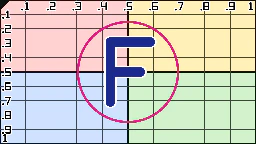 0
0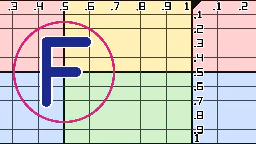 0.25
0.25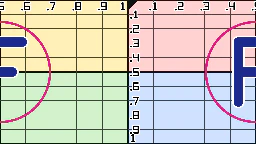 0.5
0.5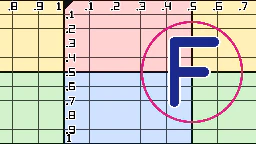 -0.25
-0.25scrollX (still at time = 0): s0.initImage("https://hydra-ref.audiodude.xyz/cards/uv-grid.png")
src(s0).scrollX({scrollX}, 0).out()
· outlined tile = defaultspeed= 0
Continuous horizontal scrolling, in screen widths per second. Positive moves the image left.
- Useful range
- -1 … 1
- Units
- screen widths / second
- No-op at
0- Negative values
- scrolls right
- Accepts
- number · array · function
Same as scroll's speedX; renamed because this function has only one axis.
speed (3s loops): s0.initImage("https://hydra-ref.audiodude.xyz/cards/uv-grid.png")
src(s0).scrollX(0, {speed}).out()
· outlined tile = defaultscrollY
Section titled “scrollY”Vertical-only scroll. Still wraps both axes into 0–1.
| Parameter | Default | Useful range | Units | No-op at |
|---|---|---|---|---|
scrollY | 0.5 | -1 … 1 | screen heights | 0 (or any whole number), with speed = 0; the wrap still applies |
speed | 0 | -1 … 1 | screen heights / second | 0 |
scrollY= 0.5
Fixed vertical shift, in screen heights. Positive moves the image up.
- Useful range
- -1 … 1
- Units
- screen heights
- No-op at
0(or any whole number), withspeed= 0; the wrap still applies- Negative values
- moves the image down
- Periodic
- every
1 - Accepts
- number · array · function
Same as scroll's scrollY, including the 0.5 default (half a screen, not a no-op).
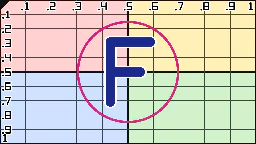 0
0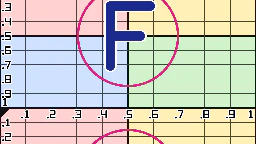 0.25
0.25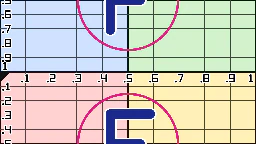 0.5
0.5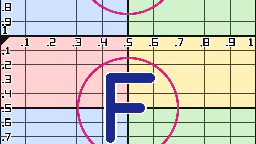 -0.25
-0.25scrollY (still at time = 0): s0.initImage("https://hydra-ref.audiodude.xyz/cards/uv-grid.png")
src(s0).scrollY({scrollY}, 0).out()
· outlined tile = defaultspeed= 0
Continuous vertical scrolling, in screen heights per second. Positive moves the image up.
- Useful range
- -1 … 1
- Units
- screen heights / second
- No-op at
0- Negative values
- scrolls down
- Accepts
- number · array · function
Same as scroll's speedY; renamed because this function has only one axis.
speed (3s loops): s0.initImage("https://hydra-ref.audiodude.xyz/cards/uv-grid.png")
src(s0).scrollY(0, {speed}).out()
· outlined tile = defaultGotchas
Section titled “Gotchas”- The order of
scrollrelative to other geometry matters. Read the chain left to right as operations on the image:.rotate(…).scroll(0.25, 0)turns the image and then slides the result left;.scroll(0.25, 0).rotate(…)slides first, so the slide happens along the rotated direction. speedX/speedYmultiplytime, which keeps growing; changing them live makes the image jump. Pass a function toscrollX/scrollYthat accumulates its own offset if you need smooth changes of pace.- Use
modulateScrollX/modulateScrollYto scroll by an amount that varies per pixel.
Related
Section titled “Related”- rotate: combine with
scrollto rotate around any point (third example). - osc: choose
frequency = 2 * Math.PI * nso scrolled stripes wrap without a seam. - Coordinate space: why geometry runs “backwards” through the chain.
- Arguments & time: arrays and functions as shift and speed arguments.
Documents hydra-synth 1.4.0 (AGPL-3.0; this site runs it unmodified). Annotations drafted by Claude (Anthropic) from the hydra-synth source and checked against rendered output — see about. Site code AGPL-3.0, prose CC BY 4.0,source.